
OCR (Optical Character Recognition) barcodes are a versatile tool for capturing both alphanumeric and textual data, enabling faster and more accurate data entry across various industries. These barcodes are commonly used in retail, healthcare, inventory management, and more. They differ from traditional barcodes by storing a combination of letters and numbers, making them ideal for a wider range of applications.
How to Enable OCR Scanning on TEEMI 2D Scanners:
To activate the OCR function on your TEEMI 2D scanner, please follow these steps:
-
Scan the Configuration Code: To enable OCR scanning, scan the special configuration code below. This code is specifically designed for TEEMI 2D scanners.

-
OCR Function Activation: Once the code is scanned, the OCR scanning function will be enabled on your TEEMI 2D scanner. From this point on, your scanner will be able to read and decode OCR barcodes effectively.
Note: This configuration code only works with TEEMI 2D scanners. Make sure you are using a TEEMI 2D model to ensure compatibility.
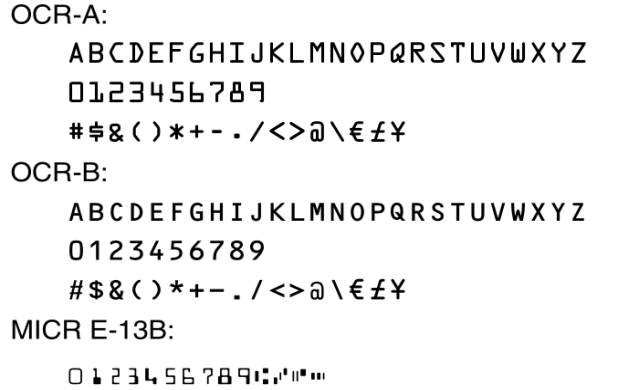
Supported OCR Types:
Our scanner supports the following OCR types:
If your scanner is still not reading your barcodes, please kindly send a clear picture of the barcode to support@teemistore.com. We will test it for you and assist in troubleshooting the issue.
With OCR scanning enabled, your TEEMI 2D scanner will be ready to handle a wider variety of barcodes, improving your data management and efficiency. Enjoy seamless scanning for all your OCR barcode needs!
To deactivate OCR barcodes, please scan the barcode below to configure the setting.
Comments
0 comments
Please sign in to leave a comment.